🌟 Built for Automotive Dealerships

The Timeclock Your Team Actually Uses

A complete workforce management system purpose-built for dealerships — tracking time, overtime, vacation, sick leave, and compliance across every department from a single dashboard.

40+
System Features
3
Access Roles
iOS + Android
Mobile App
STAFF BOARD — SALES
●️ Clocked In (4)
J. Rivera
7:58 AM
IN
M. Rivera
8:12 AM
IN
D. Thompson
Lunch 12:30 PM
LUNCH
S. Patel
8:45 AM
IN
▮️ Gone Today (2)
R. Chen
Out 5:02 PM
DONE
T. Williams
Out 4:55 PM
DONE
BALANCES
🏖 Vacation
48.5
hours available
🤬 Sick Time
24.0
hours available
WEEKLY TIMECARD
Mon 03/24
8.5
OT: 0.5
Tue 03/25
8.0
OT: —
Wed 03/26
9.2
OT: 1.2
Thu 03/27
8.0
OT: —
Week Total33.7 hrs

Built from the ground up for dealership operations

Every feature was designed around the real-world workflows of automotive service, sales, parts, and office departments.

⏱️

Real-Time Time Tracking

Clock in, clock out, and manage lunch breaks with a simple PIN-based interface. Works from any browser on-site.

📈

Automatic OT & DT Calculation

Daily overtime and double-time calculated per-employee based on individual thresholds. Period totals summed correctly in tenths of hours.

🏖

Vacation & Sick Accrual

Automatic balance calculation based on hire date and accrual rate. Full and part-time employees handled separately. HR balance panel on approval.

👥

Live Staff Board

Real-time view of who's clocked in, at lunch, or gone for the day — organized by department with filter pills.

📝

Change Request Workflow

Employees submit timecard corrections that flow through manager approval. Certified periods are locked. Full audit trail on every action.

Digital Timecard Certification

Employees digitally certify their timecard each pay period. California-compliant certification statement with digital signature capture.

⚠️

OT & Late Lunch Alerts

Automatic alerts when daily OT exceeds threshold or a lunch starts past the legal deadline. Managers review and acknowledge both from one Alerts page, with notes and full shift detail.

🎉

Paid Holidays

Company holidays are configured once. Eligible full-time employees with a normal schedule for that day are credited holiday pay automatically — no punch required, and it never counts toward overtime.

📚

Offsite Training Hours

Employees request paid hours for required off-site training days. A manager approves, then HR finalizes the hours per day — credited to the timecard without touching overtime calculations.

🏁

End of Shift Prediction

Employees see a live estimate of when their shift ends, calculated from their actual lunch length and personal overtime threshold — no mental math, no guessing.

☕️

Live Lunch Compliance

Real-time monitoring flags employees approaching or past the legal lunch deadline. A late lunch requires the employee to sign a digital attestation before the punch is recorded.

🔒

Security & Access Control

IP allowlist, role-based access, brute force protection, password expiry policy with forced reset, and full session management.

📋

Comprehensive Audit Log

Every action logged — logins, time edits, approvals, role changes, password changes, and more. Immutable. Filter by employee, event, date picker, and day-by-day navigation.

❌️

No Show / No Call Tracking

Managers record no-shows from the web or mobile app. "No Show" badge appears on the staff board. Email notifications sent to department subscribers. Admin log with void capability.

📅

Accrual Exemptions

Admin can exempt individual employees from vacation accrual for specific months with a required reason. Retroactive — adding or removing exemptions recalculates balances immediately.

📋

Time Off Allocation Report

Consolidated view of every per-day hour assignment — vacation, sick, and unpaid — across all employees. Filter by month, department, employee, and type with summary totals.

Weekly
& Semi-Monthly
pay period support
3-Tier
Approval Workflow
employee → manager → HR
CA
Labor Law Compliant
lunch, OT, certification
Zero
Third-Party Dependencies
runs on your own server

Every shift. Every department. One view.

Weekly and semi-monthly reports show clock in, lunch out, lunch back, clock out, and per-day regular, overtime, and double-time hours — with period totals summed correctly.

  • ✓️
    Weekly & semi-monthly — dept-specific report routing
  • ✓️
    Reg / OT / DT per row — calculated at daily threshold, totalled at period level
  • ✓️
    Missed lunch flagging — [*] marker on shifts with no lunch return recorded
  • ✓️
    Printable layouts — landscape-optimized, auto-print, one sheet per employee
  • ✓️
    Bulk timecard print — entire pay period for all departments at once
Weekly Timecard — Technician Dept Wk of 03/24/2026
MonTueWedThuFri
In7:588:027:558:108:00
Lunch12:3012:1512:4512:2012:30
Return1:001:021:181:051:00
Out5:305:156:455:005:30
Reg8.08.08.07.88.0
OT1.5
Total: 41.3h OT: 1.5h DT: —

Vacation and sick requests, fully automated.

A two-stage approval workflow routes requests from the submitting employee through their department manager and then to HR — with balance checks at every stage.

  • ✓️
    Vacation, sick & unpaid requests — digital signature, comments, auto-calculated return date
  • ✓️
    Per-day hour assignment — HR assigns specific hours to each calendar day at approval. Running calculator enforces all hours are accounted for
  • ✓️
    HR balance panel — shows available, requested, and projected balance at approval stage. Red warning if negative
  • ✓️
    Vacation calendar — monthly view, color-coded by dept, approved and pending
  • ✓️
    Void with auto-decertification — voiding an approved request automatically decertifies any affected timecard period
  • ✓️
    Time off allocation report — consolidated view of every per-day assignment with type, employee, and approver detail
Time Off Request — HR Review Awaiting HR
Employee
A. Martinez
Type
Vacation
Hours
40.0
Start
May 5, 2026
End
May 9, 2026
Return
May 12, 2026
🏖 Vacation Balance — A. Martinez
Available
96.5 hrs
Requested
40.0 hrs
If Approved
56.5 hrs

Holiday pay, calculated automatically.

Configure each company holiday once. Eligibility for every active employee is worked out from tenure, employment type, and whether the holiday falls on a day they normally work — no manual entry, no spreadsheets.

  • ✓️
    Smart eligibility — full-time status, hire-date tenure, and normal-workday inference from recent shift history
  • ✓️
    Per-employee override — grant or deny pay for any employee on any holiday, with the reason recorded on the review screen
  • ✓️
    Half-day support — set a custom hour amount per holiday, e.g. 4 hours for a half-day closure
  • ✓️
    Locked at certification — holiday pay freezes once a timecard is certified, immune to later threshold or eligibility changes
  • ✓️
    Never counts toward OT — holiday hours are pay-only and excluded from every overtime calculation
🎉 Independence Day — Review Jul 4, 2026 • 8.0 hrs
EmployeeDeptVerdict
J. RiveraSales Eligible • +8.0 hrs
A. MartinezService Eligible • +8.0 hrs
M. RiveraService Not a scheduled workday (0/4)
D. ThompsonParts Hired inside tenure window
🎉 Admin override available — grant or deny pay for any employee, individually, right from this screen.

Required training, paid correctly.

When work happens off-site — training, certification courses, manufacturer programs — employees request the hours instead of trying to clock in from somewhere they physically can't.

  • ✓️
    Multi-date requests — pick any combination of training dates in one submission, no forced date range
  • ✓️
    Two-stage approval — manager approves, then HR finalizes the exact hours for each day
  • ✓️
    Defaults to OT threshold — pre-filled per employee at approval, adjustable for half-days
  • ✓️
    Conflict warnings — flags dates that already have clock punches or approved time off so nothing gets paid twice
  • ✓️
    Locked at certification — like holiday pay, offsite hours freeze once the timecard is certified
  • ✓️
    Never counts toward OT — offsite hours are pay-only and excluded from every overtime calculation
🎓 Offsite Training — HR Review Awaiting HR
Employee
K. Nguyen
Training
ProFirst Certification
Mon Aug 3 • 8.0h Tue Aug 4 • 8.0h Wed Aug 5 • 4.0h
🎓 Hours Per Day
Default
8.0 hrs
Total Requested
20.0 hrs

Alerts that actually get seen.

Two automatic alert types, one Alerts page. Daily overtime above threshold and lunches started past the legal deadline are both flagged the moment they happen, pushed to the manager's phone, and tracked until acknowledged.

  • ✓️
    OT alerts, auto-generated on clock-out — one per employee per day, full shift detail included
  • ✓️
    Late lunch attestation — starting lunch after the 5-hour mark requires a signed reason before the punch is recorded
  • ✓️
    Push notification to managers — immediate mobile alert for either alert type
  • ✓️
    Email notification — department subscribers receive full shift detail on OT alerts
  • ✓️
    Employee reminder — amber notice on next clock-in until an OT alert is acknowledged
  • ✓️
    OT Alert Report — admin summary grouped by dept and employee with manager breakdown
⚠️ Alerts 3 pending
⚠️ OT Alerts
☕️ No Lunch
DateEmployeeDeptOT Hrs
Fri Mar 27J. RiveraSales 1.5
Fri Mar 27M. RiveraService 2.3
Thu Mar 26D. ThompsonParts 1.1
☕️ No Lunch tab example — "K. Nguyen, lunch started at 6.4 hrs. Reason: Work required — per manager J. Smith. Signed: K. Nguyen."

The right tools for every role

Role 0

Employee

Clock in/out and manage personal records

⏱️Clock in, lunch, and clock out from any on-site browser
🏁Live End of Shift estimate — updates from actual lunch length and personal OT threshold
📈View own weekly and semi-monthly timecard
📝Submit timecard correction change requests
🏖Request vacation, sick, and offsite training hours with digital signature
✓️Certify timecard each pay period
🏦View real-time vacation and sick hour balances
Role 1

Manager

Full visibility into assigned departments

👥Live staff board — all departments or assigned only
✅️Approve or deny timecard change requests
🏖First-stage approval for time off and offsite training requests
⚠️Acknowledge OT alerts and late lunch attestations, with shift detail
🤬Record and track employee sick calls
❌️Record No Show / No Call with board badge and email alerts
🔔Email notifications for change requests, sick calls, no-shows, and OT alerts
Role 2

Admin / HR

Complete system control and reporting

🔐Full access to all reports, employees, and settings
✅️HR final approval and hour assignment for time off and offsite training requests
🎉Configure paid holidays and eligibility rules, with per-employee overrides
👁View-As mode — see the system as any employee
📋Complete audit trail — every action logged and searchable
⏱️Lunch compliance, late lunch attestations, hours warning, OT alert, sick frequency, and no-show reports
📅Vacation accrual exemptions, time off allocation, and vacation usage reports
📢System-wide announcements, password policy, IP allowlist

The full experience, in their pocket.

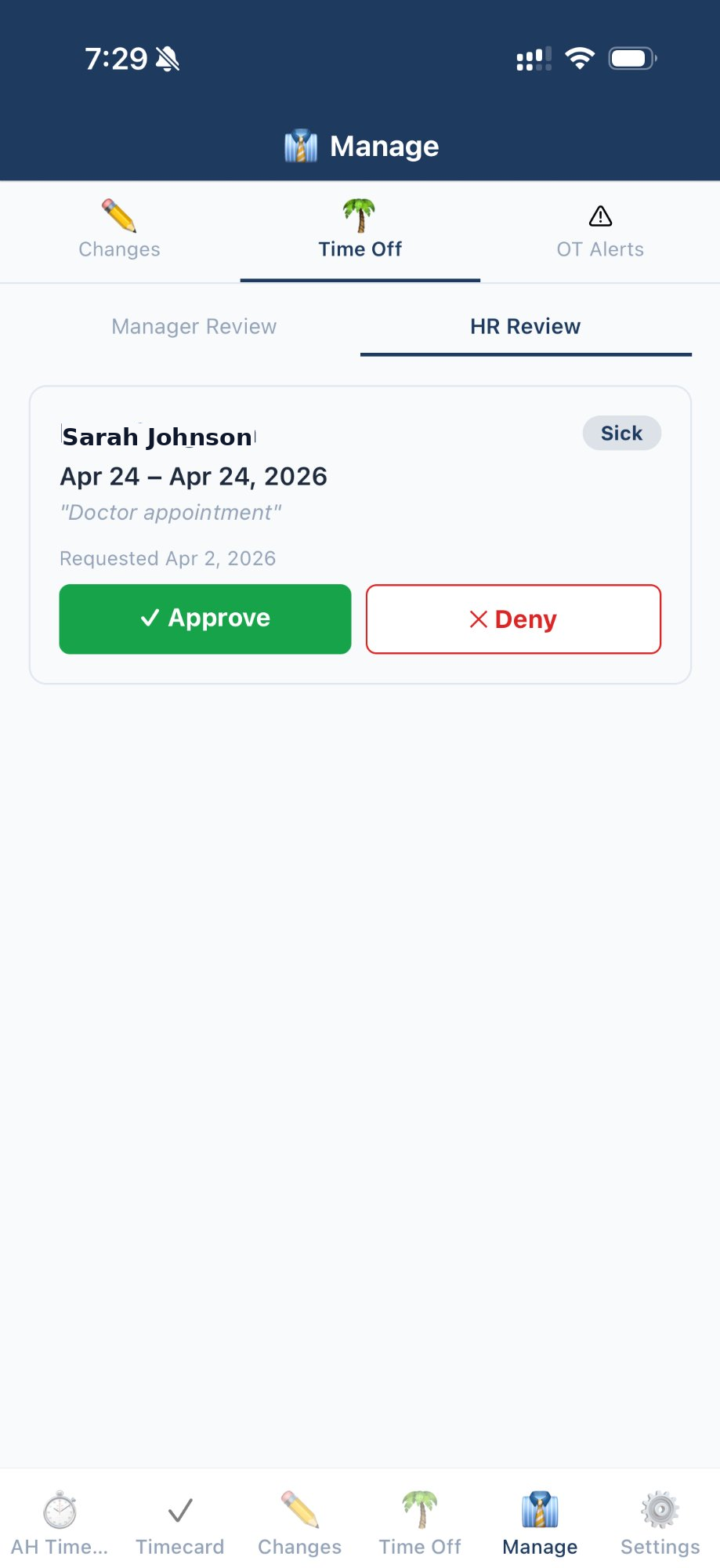
The native mobile app gives employees geo-locked clock actions and gives managers a full approval dashboard — all from their phone. No browser required.

  • 📷Geo-locked clock-in — GPS radius enforcement prevents off-site punches. Configurable per location.
  • 🏁End of Shift chip & lunch reminder — a live shift-end estimate on the dashboard, plus a local notification 30 minutes before the lunch deadline.
  • 📋One Requests tab — employees submit change requests, time off, and offsite training hours in one place, with full status history.
  • 👥Manager Alerts & approvals — approve or deny change requests, time off, and offsite training; acknowledge OT and late-lunch alerts; record sick calls and no-shows. Role-gated — employees never see it.
  • 🔔Push notifications — OT and late-lunch alerts, request status updates, cert reminders, and password expiry warnings sent instantly.
  • 🌎React Native — iOS & Android — single codebase, native performance on both platforms.
  • 🔒Secure token auth — device-bound 30-day session tokens. Revocable per device from the admin panel.
  • 📢System announcements — HR messages with optional acknowledgement appear on the app dashboard.
Employee
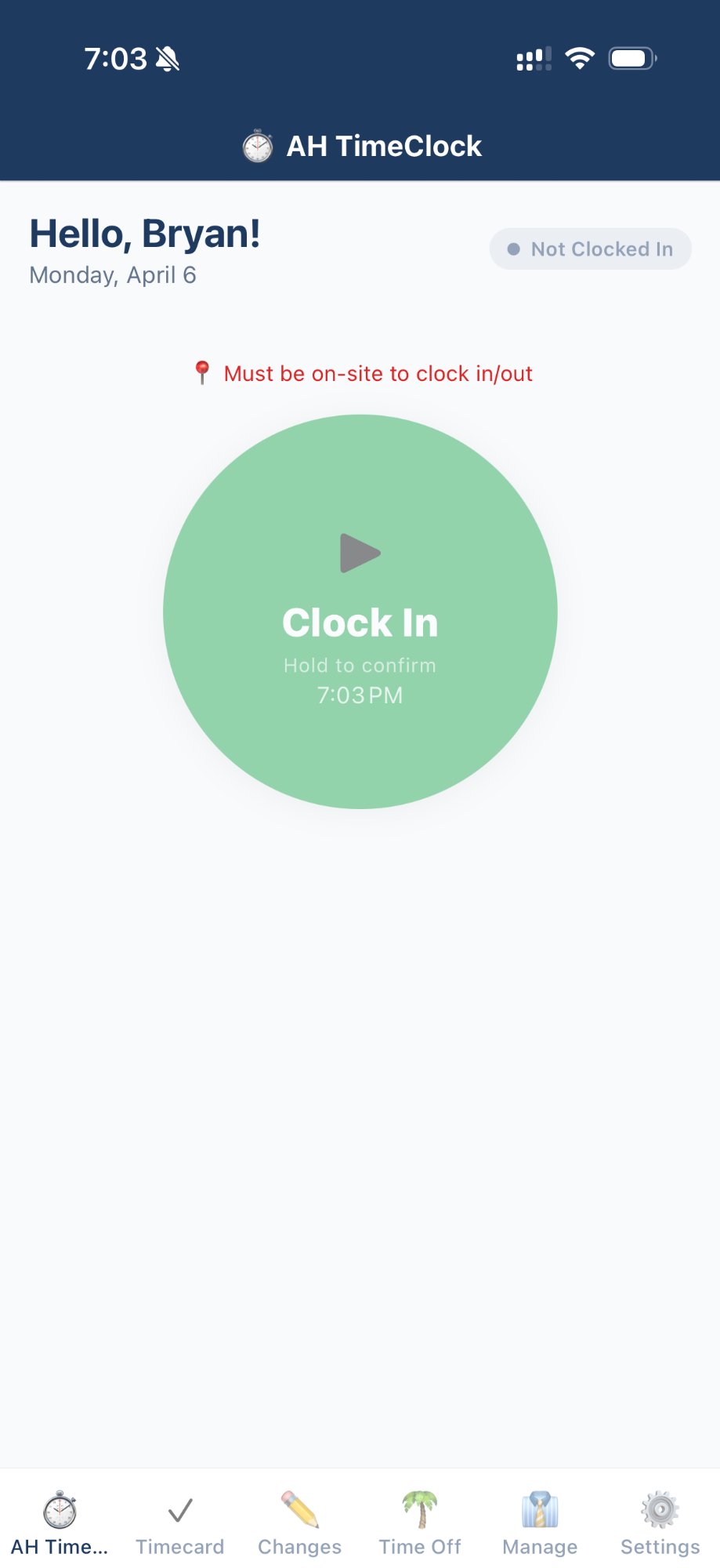
DealerTimeClock employee dashboard showing clock in button and geo-lock status
Manager
DealerTimeClock manager tab showing time off HR review with approve and deny buttons

Built to protect your data

🌐

IP Allowlist

Only approved IP addresses can access the system for employees and managers. Admins can manage the list in real time. Unauthorized attempts are blocked and logged immediately.

🚫

Brute Force Protection

Configurable lockout after failed login attempts — with remaining attempt warnings shown to the user. Separate policies per role. Active bans visible in admin with one-click lift.

🔐

Two-Factor Authentication

TOTP-based 2FA for admin accounts — compatible with Google Authenticator and Authy. QR code self-service setup, 5 single-use backup codes, and 3-attempt lockout on verification.

🔒

Password Strength & Expiry

Minimum 8 characters with uppercase, lowercase, number, and special character enforced on every password change. Configurable expiry intervals per role with forced reset on login when expired.

🌎

Geographic Login Alerts

Failed login attempts from outside the configured home state trigger an immediate email alert to the admin — with the IP address, detected city, state, and ISP included. IP results cached 24 hours.

👁

Admin View-As Mode

Admins can view the system exactly as any employee sees it — without the ability to perform any actions. All write operations blocked. Start and end of each session logged to the audit trail.

⏱️

Session Timeout Warning

Employees see a countdown modal 60 seconds before their session expires. A single tap refreshes the session without a page reload. Automatic redirect to login on timeout.

📋

Immutable Audit Log

Every action in the system — logins, time edits, approvals, role changes, deactivations, password resets — is permanently recorded with timestamp, actor, target, and IP address.

Ready to bring your dealership's workforce into the modern era?

DealerTimeClock is battle-tested, dealer-proven, and ready to deploy. Fill out the form and we'll be in touch within one business day.

Typically live within 2 weeks • Full onboarding support included • California labor law compliant